.svg)
.svg)
.svg)
Ambition Just Got Better with Saved Filters

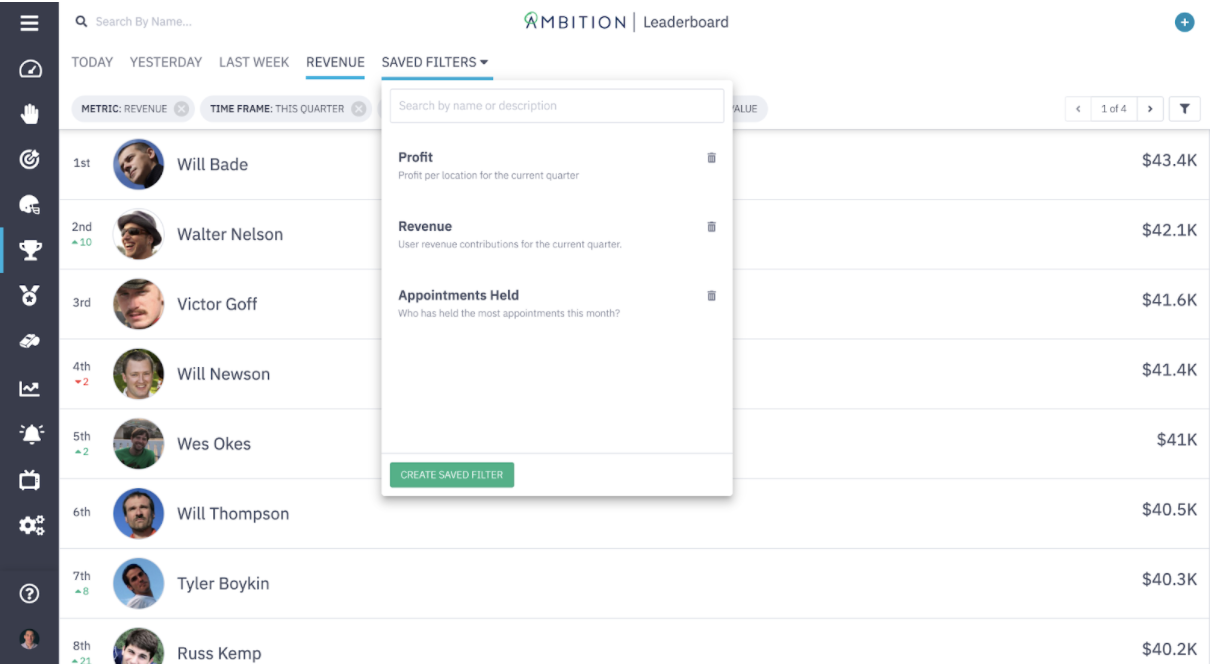
Bookmark your favorite custom Leaderboards with our latest release
Sales leaders like you need efficiency wherever you can get it. Your days are packed managing hybrid teams, interfacing with top-tier prospects, and forecasting for executive leadership—and we know even the smallest Ambition enhancements can give you valuable time back. That’s why we’re excited to roll out Saved Filters within Leaderboards.
Saved Filters allows you to bookmark your favorite Leaderboards, toggle between them, and keep a real-time pulse on your reps’ performance. Instead of manually applying filters each time you need a status refresh, Saved Filters reconfigures your Leaderboard selections (and the data) with a single click.
“The faster you can access data about your team’s daily, weekly, or monthly performance, the better equipped you are to help everyone stay consistent and hit goal,” said Nick Love, Ambition product expert.
To build custom Leaderboards in your Ambition instance, you can apply filters that organize rep performance by Activity Type, Time Frame, Metric, or Group. A few Leaderboard options you might want to build and save right away include:
- Daily call volume per SDR
- Meetings set per rep per week
- Revenue leaders by month
August 10, 2021 release details
Ambition users: Bookmarking your favorite customized Leaderboards couldn’t be easier!
To build your library of Leaderboards, follow these simple steps.
- Click ‘Create Saved Filter’
- Configure your custom view
- Give the Leaderboard a title and description
- Click save
- Visit the ‘Saved Filters’ tab to see all of your Leaderboards
The way Ambition visualizes performance data via Leaderboards makes it easy to see at a glance who is getting ahead, who is lagging behind, and who is just getting by. Reminder: you have the ability to keep your custom Leaderboards to yourself for coaching purposes or share them with your team to fuel friendly competition.
So what are you waiting for? Get the improved functionality and streamline your processes now with Saved Filters. Get the release notes here or schedule a demo to learn more.
See the system in action
Insights for high-achieving sales teams
.png)
Outbound Is Harder Than Ever. Here’s What’s Working Now: A Conversation with Jorge Soto
.png)


Stop chasing targets, start predicting revenue
Transform your revenue org into a high-performing growth engine with structured insights, top-down visibility, and built-in consistency.
%20(1).png)
.svg)
.svg)