


How To: Coach with Skills — Turn Your Best Coaching Questions into One-Click AI Prompts


If you coach in Ambition, your 1:1s already have structure. Sessions are on the calendar, the agenda is set, and a Pre-Read can summarize performance before you walk in.
But most managers still have a few questions of their own they want answered before every conversation, like how a rep is tracking on one specific metric, or whether last week's commitments are showing up in the numbers. Right now, that usually means typing the same request into the AI Agent each time, worded a little differently by every manager.
Skills turn those questions into a saved prompt. Write it once, run it for any rep with a click, and share it so every coach on your team gets the same answers the same way.
What a Skill is (and where it fits with Pre-Reads)
A Skill is a reusable prompt that runs inside the Ambition AI Agent. Skills come from three places:
- Ambition built-in Skills, available to everyone. Coaching Prep is one of them.
- Company Skills, built by your admins and shared to the team.
- Personal Skills, the ones you write for yourself.
The key ingredient for coaching is parameters. Wrap a word in curly brackets, like {Employee}, and the Skill asks who to run it for each time. One Skill now works for every rep on your team.
If you already use AI Pre-Reads, think of Skills as the next layer. A Pre-Read gives you a standard brief inside a Session. A Skill lets you ask the questions you always ask, in the way you always ask them, from anywhere in the Agent.
6 Steps to Coach with Skills
1. Start with the built-in Coaching Prep Skill
Open the AI Agent and find Coaching Prep in your Skill cards, or click All Skills. Run it before your next 1:1 to see what a coaching Skill gives you out of the box. This is your baseline.
2. Write down the questions you always ask
Before you build anything, list what you check before every session. Pacing to goal? Activity trends? Follow-through on last week's commitments? Those questions become your prompt.
3. Build your Skill
Go to Hub → Skills → + New Skill. Give it a clear Name and a one-to-two sentence Description. In the Prompt field, write the instructions the Agent should follow.
Short on time? Pick a starting point from the Skill Library at the top of the page. Its fields fill in for you, and you can edit any of them.
4. Add a parameter so it works for any rep
Put {Employee} in your prompt wherever the rep's name would go. Then, in the Parameters section, set that drop-down to Employee. Coaching a whole team? Use a Group parameter instead. Skills also support Goal, Competition, Matchup, and Metric parameters.
5. Preview before you save
Click Preview & Save. Pick a rep, click Run Preview, and read the output. If it misses the mark, click Cancel and tighten the prompt. When it reads like the brief you'd write yourself, click Confirm & Save.
6. Run it before every session
In the AI Agent chat, click the Skill's card or type / to pull up your Skills list. Choose the rep, and you walk into the 1:1 with your own prep already done.
What you need: The Ambition AI Agent must be enabled. Anyone can create Skills for their own use. To share a Skill with your direct and skip-level reports, you need AI: Skill Sharing: Can Share Skills for Subordinate Users. To share with anyone in the org, you need AI: Skill Sharing: Can Share Skills with Anyone.
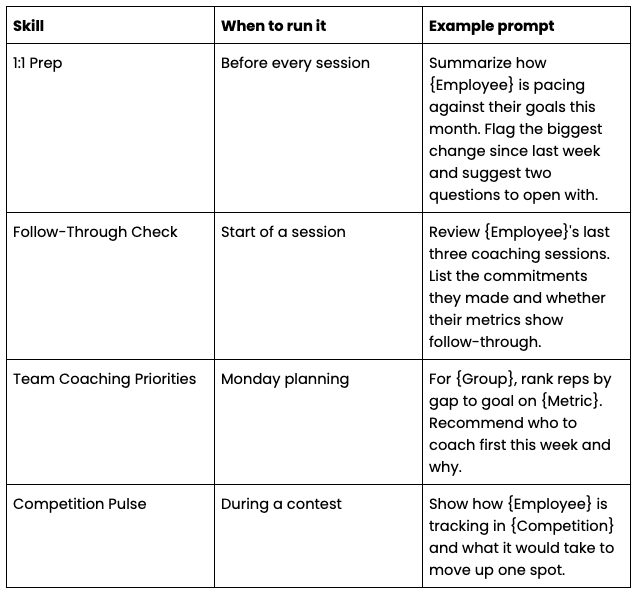
4 Coaching Skills Worth Building
Need a starting point? Here are four Skills to copy, then tweak for your team. (These are example prompts, not built-ins.)
Tips for coaching with Skills
- Make it specific. "Suggest two questions" beats "give me some ideas." Specific prompts produce briefs you'll actually use.
- Keep one job per Skill. A prep Skill and a follow-through Skill are easier to tune than one Skill that does both.
- Share what works. When a manager's Skill gets results, ask an admin to share it as a Company Skill. Now every coach runs the same playbook.
- Pair it with analytics. Use Coaching Analytics to see whether teams running the shared Skill are coaching more often, and whether it's working.
Start with one Skill this week
You don't need a library of ten. Pick the question you ask before every 1:1, turn it into a Skill with an {Employee} parameter, and run it before your next session.
Great coaching is a repeatable routine. Skills make that routine one click away, for you and for every coach on your team.
See the system in action
Insights for high-achieving sales teams

Stop chasing targets, start predicting revenue
Transform your revenue org into a high-performing growth engine with structured insights, top-down visibility, and built-in consistency.


